CPieChart
CPieChart
绘制饼图的类。
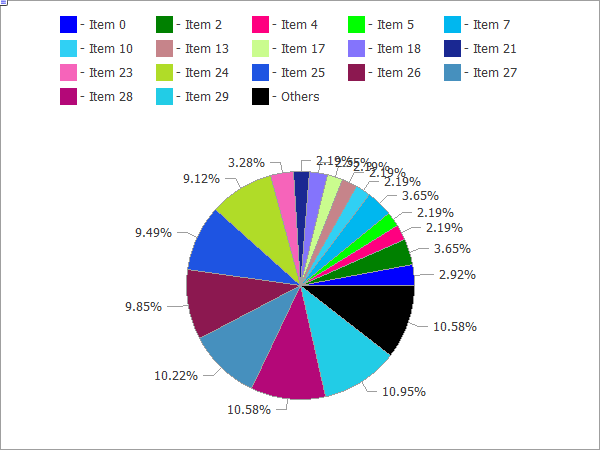
下面提供图形上方的代码。
描述
该类中包含的方法专为饼图的全比例操作而设计,从创建图形资源到设计片段标签。
声明
class CPieChart : public CChartCanvas主题
#include <Canvas\Charts\PieChart.mqh>继承体系
CPieChart
类函数
| 方法 | 动作 |
|---|---|
| Create | 创建图形资源的虚拟方法。 |
| SeriesSet | 设置将在饼图上显示的序列值。 |
| ValueAdd | 添加新值到饼图(到结束)。 |
| ValueInsert | 插入新值到饼图(指定位置)。 |
| ValueUpdate | 更新饼图上的值(指定位置)。 |
| ValueDelete | 从饼图删除值(指定位置)。 |
| DrawChart | 绘制饼图及其全部元素的虚拟方法。 |
| DrawPie | 绘制对应指定值的饼图片段。 |
| LabelMake | 基于其值和原标签生成片段标签。 |
方法继承自类 CChartCanvas
: ColorBackground, ColorBackground, ColorBorder, ColorBorder, ColorText, ColorText, ColorGrid, ColorGrid, MaxData, MaxData, MaxDescrLen, MaxDescrLen, AllowedShowFlags, ShowFlags, ShowFlags, IsShowLegend, IsShowScaleLeft, IsShowScaleRight, IsShowScaleTop, IsShowScaleBottom, IsShowGrid, IsShowDescriptors, IsShowPercent, ShowLegend, ShowScaleLeft, ShowScaleRight, ShowScaleTop, ShowScaleBottom, ShowGrid, ShowDescriptors, ShowValue, ShowPercent, LegendAlignment, Accumulative, VScaleMin, VScaleMin, VScaleMax, VScaleMax, NumGrid, NumGrid, VScaleParams, DataOffset, DataOffset, DataTotal, DescriptorUpdate, ColorUpdate
示例
//+------------------------------------------------------------------+
//|                                               PieChartSample.mq5 |
//|                   Copyright 2009-2017, MetaQuotes Software Corp. |
//|                                              http://www.mql5.com |
//+------------------------------------------------------------------+
#property copyright   "2009-2017, MetaQuotes Software Corp."
#property link        "http://www.mql5.com"
#property description "Example of using pie chart"
//---
#include <Canvas\Charts\PieChart.mqh>
//+------------------------------------------------------------------+
//| 输入                                                             |
//+------------------------------------------------------------------+
input int      Width=600;
input int      Height=450;
//+------------------------------------------------------------------+
//| 脚本程序起始函数                                                   |
//+------------------------------------------------------------------+
int OnStart(void)
  {
//--- 检查
   if(Width<=0 || Height<=0)
     {
      Print("Too simple.");
      return(-1);
     }
//--- 创建图表
   CPieChart pie_chart;
   if(!pie_chart.CreateBitmapLabel("PieChart",10,10,Width,Height))
     {
      Print("Error creating pie chart: ",GetLastError());
      return(-1);
     }
   pie_chart.ShowPercent();
//--- 绘制
   for(uint i=0;i<30;i++)
     {
      pie_chart.ValueAdd(100*(i+1),"Item "+IntegerToString(i));
      Sleep(10);
     }
   Sleep(2000);
//--- 禁用图例
   pie_chart.LegendAlignment(ALIGNMENT_LEFT);
   Sleep(2000);
//--- 禁用图例
   pie_chart.LegendAlignment(ALIGNMENT_RIGHT);
   Sleep(2000);
//--- 禁用图例
   pie_chart.LegendAlignment(ALIGNMENT_TOP);
   Sleep(2000);
//--- 禁用图例
   pie_chart.ShowLegend(false);
   Sleep(2000);
//--- 禁用百分比
   pie_chart.ShowPercent(false);
   Sleep(2000);
//--- 禁用描述符
   pie_chart.ShowDescriptors(false);
   Sleep(2000);
//--- 全部启用
   pie_chart.ShowLegend();
   pie_chart.ShowValue();
   pie_chart.ShowDescriptors();
   Sleep(2000);
//--- 或这样
   pie_chart.ShowFlags(FLAG_SHOW_LEGEND|FLAG_SHOW_DESCRIPTORS|FLAG_SHOW_PERCENT);
   uint total=pie_chart.DataTotal();
//--- 使用值
   for(uint i=0;i<total && !IsStopped();i++)
     {
      pie_chart.ValueUpdate(i,100*(rand()%10+1));
      Sleep(1000);
     }
//--- 使用颜色
   for(uint i=0;i<total && !IsStopped();i++)
     {
      pie_chart.ColorUpdate(i%total,RandomRGB());
      Sleep(1000);
     }
//--- 循环
   while(!IsStopped())
     {
      pie_chart.DataOffset(pie_chart.DataOffset()+1);
      Sleep(200);
     }
//--- 完成
   pie_chart.Destroy();
   return(0);
  }
//+------------------------------------------------------------------+
//| 随机RGB颜色                                                       |
//+------------------------------------------------------------------+
uint RandomRGB(void)
  {
   return(XRGB(rand()%255,rand()%255,rand()%255));
  }