CZ_ShapedMembershipFunction
CZ_ShapedMembershipFunction
通过A和B参数实施z-like归属函数的类。
描述
该函数设置z-like双参数归属函数。这是一个选取1到0值的非递增归属函数。该函数参数定义了函数递减从1到0的非线型轨迹的间隔。
该函数表示“非常低”类型的模糊集。换句话说,它通过饱和度设置了非递增归属函数。
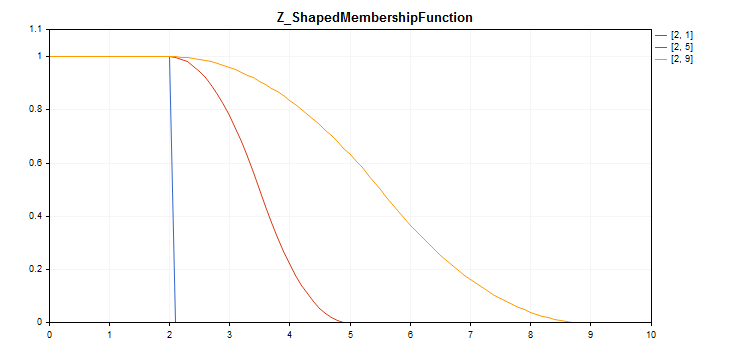
绘制图表的示例代码显示如下。
声明
class CZ_ShapedMembershipFuncion : public IMembershipFunction主题
#include <Math\Fuzzy\membershipfunction.mqh>继承体系
CZ_ShapedMembershipFunction
类方法
| 类方法 | 描述 |
|---|---|
| A | 获取和设置减少间隔的开始参数。 |
| B | 获取和设置减少间隔的结束参数。 |
| GetValue | 通过指定自变数计算归属函数值。 |
方法继承自类 CObject
: Prev, Prev, Next, Next, Save, Load, Type, Compare
示例
//+------------------------------------------------------------------+
//|                                   Z_ShapedMembershipFunction.mq5 |
//|                        Copyright 2016, MetaQuotes Software Corp. |
//|                                             https://www.mql5.com |
//+------------------------------------------------------------------+
#include <Math\Fuzzy\membershipfunction.mqh>
#include <Graphics\Graphic.mqh>
//--- 创建归属函数
CZ_ShapedMembershipFunction func1(2,1);
CZ_ShapedMembershipFunction func2(2,5);
CZ_ShapedMembershipFunction func3(2,9);
//--- 创建归属函数包装程序
double Z_ShapedMembershipFunction1(double x) { return(func1.GetValue(x)); }
double Z_ShapedMembershipFunction2(double x) { return(func2.GetValue(x)); }
double Z_ShapedMembershipFunction3(double x) { return(func3.GetValue(x)); }
//+------------------------------------------------------------------+
//| 脚本程序起始函数                                                   |
//+------------------------------------------------------------------+
void OnStart()
  {
//--- 创建图形
   CGraphic graphic;
   if(!graphic.Create(0,"Z_ShapedMembershipFunction",0,30,30,780,380))
     {
      graphic.Attach(0,"Z_ShapedMembershipFunction");
     }
   graphic.HistoryNameWidth(70);
   graphic.BackgroundMain("Z_ShapedMembershipFunction");
   graphic.BackgroundMainSize(16);
//--- 创建曲线
   graphic.CurveAdd(Z_ShapedMembershipFunction1,0.0,10.0,0.1,CURVE_LINES,"[2, 1]");
   graphic.CurveAdd(Z_ShapedMembershipFunction2,0.0,10.0,0.1,CURVE_LINES,"[2, 5]");
   graphic.CurveAdd(Z_ShapedMembershipFunction3,0.0,10.0,0.1,CURVE_LINES,"[2, 9]");
//--- 设置X轴属性
   graphic.XAxis().AutoScale(false);
   graphic.XAxis().Min(0.0);
   graphic.XAxis().Max(10.0);
   graphic.XAxis().DefaultStep(1.0);
//--- 设置Y轴属性
   graphic.YAxis().AutoScale(false);
   graphic.YAxis().Min(0.0);
   graphic.YAxis().Max(1.1);
   graphic.YAxis().DefaultStep(0.2);
//--- 绘图
   graphic.CurvePlotAll();
   graphic.Update();
  }