Resources
资源
在 MQL4 程序中使用图形和声音
MQL4 程序允许处理声音和图形文件:
- PlaySound() 播放声音文件;
- ObjectCreate() 允许使用 图形对象 OBJ_BITMAP 和 OBJ_BITMAP_LABEL 创建用户界面。
PlaySound()
调用 PlaySound() 函数的示例:
//+------------------------------------------------------------------+
//| Calls standard OrderSend() and plays a sound                     |
//+------------------------------------------------------------------+
void OrderSendWithAudio()
  {
      double price=Ask;
      //--- place market order to buy 1 lot
      int ticket=OrderSend(Symbol(),OP_BUY,1,price,3,0,0,"My order",16384,0,clrGreen);
      if(ticket<0)
        {
         Print("OrderSend failed with error #",GetLastError());
         //--- if error play sound from timeout.wav
         PlaySound("timeout.wav");
        }
      else
        {
         Print("OrderSend placed successfully");
         //--- if success, play sound from Ok.wav
         PlaySound("Ok.wav");
        }
  }
该示例展示了如何播放标准终端包中包含的 ‘Ok.wav’ 和 ’timeout.wav’ 文件中的声音。这些文件位于 terminal_directory\Sounds 文件夹中。这里 terminal_directory 是 MetaTrader 4 客户端终端启动的文件夹。可以通过以下方式在 mql4 程序中获取终端目录的位置:
//--- Folder, in which terminal data are stored
   string terminal_path=TerminalInfoString(TERMINAL_PATH);
您可以使用来自 terminal_directory\Sounds 文件夹的声音文件,也可以来自 terminal_data_directory\MQL4 中的任何子文件夹。可以通过终端菜单“文件”->“打开数据文件夹”或程序方法获取终端数据目录的位置:
//--- Folder, in which terminal data are stored
   string terminal_data_path=TerminalInfoString(TERMINAL_DATA_PATH);
例如,如果 Demo.wav 声音文件位于 terminal_data_directory\MQL4\Files 中,那么 PlaySound() 的调用应该这样编写:
//--- play Demo.wav from the folder terminal_directory_data\MQL4\Files\
   PlaySound("\\Files\\Demo.wav");
请注意,在注释中路径使用反斜杠“\”表示,而在函数中使用“\\”。
在指定路径时,始终仅使用双反斜杠作为分隔符,因为单个反斜杠是编译器在处理程序源代码中的常量字符串和字符常量时的控制符号。
使用 NULL 参数调用 PlaySound() 函数来停止播放:
//--- call of PlaySound() with NULL parameter stops playback
   PlaySound(NULL);
ObjectCreate()
使用 ObjectCreate() 函数创建图形标签 (OBJ_BITMAP_LABEL) 的专家顾问示例。
string label_name="currency_label";        // name of the OBJ_BITMAP_LABEL object
string euro      ="\\Images\\euro.bmp";    // path to the file terminal_data_directory\MQL4\Images\euro.bmp
string dollar    ="\\Images\\dollar.bmp";  // path to the file terminal_data_directory\MQL4\Images\dollar.bmp
//+------------------------------------------------------------------+
//| Expert initialization function                                   |
//+------------------------------------------------------------------+
int OnInit()
  {
//--- create a button OBJ_BITMAP_LABEL, if it hasn't been created yet
   if(ObjectFind(0,label_name)<0)
     {
      //--- trying to create object OBJ_BITMAP_LABEL
      bool created=ObjectCreate(0,label_name,OBJ_BITMAP_LABEL,0,0,0);
      if(created)
        {
         //--- link the button to the left upper corner of the chart
         ObjectSetInteger(0,label_name,OBJPROP_CORNER,CORNER_RIGHT_UPPER);
         //--- now set up the object properties
         ObjectSetInteger(0,label_name,OBJPROP_XDISTANCE,100);
         ObjectSetInteger(0,label_name,OBJPROP_YDISTANCE,50);
         //--- reset the code of the last error to 0
         ResetLastError();
         //--- download a picture to indicate the "Pressed" state of the button
         bool set=ObjectSetString(0,label_name,OBJPROP_BMPFILE,0,euro);
         //--- test the result
         if(!set)
           {
            PrintFormat("Failed to download image from file %s. Error code %d",euro,GetLastError());
           }
         ResetLastError();
         //--- download a picture to indicate the "Unpressed" state of the button
         set=ObjectSetString(0,label_name,OBJPROP_BMPFILE,1,dollar);

         if(!set)
           {
            PrintFormat("Failed to download image from file %s. Error code %d",dollar,GetLastError());
           }
         //--- send a command for a chart to refresh so that the button appears immediately without a tick
         ChartRedraw(0);
        }
      else
        {
         //--- failed to create an object, notify
         PrintFormat("Failed to create object OBJ_BITMAP_LABEL. Error code %d",GetLastError());
        }
     }
//---
   return(INIT_SUCCEEDED);
  }
//+------------------------------------------------------------------+
//| Expert deinitialization function                                 |
//+------------------------------------------------------------------+
void OnDeinit(const int reason)
  {
//--- delete an object from a chart
   ObjectDelete(0,label_name);
  }
名为 currency_label 的图形对象的创建和设置是在 OnInit() 函数中完成的。图形文件的路径设置在全局变量 euro 和 dollar 中,使用双反斜杠作为分隔符:
string euro      ="\\Images\\euro.bmp";    // path to the file terminal_dara_directory\MQL4\Images\euro.bmp
string dollar    ="\\Images\\dollar.bmp";  // path to the file terminal_dara_directory\MQL4\Images\dollar.bmp
这些文件位于 terminal_data_directory\MQL4\Images 文件夹中。
OBJ_BITMAPLABEL 对象实际上是一个按钮,根据按钮状态(按下或未按下)显示两种图像之一:euro.bmp 或 dollar.bmp。
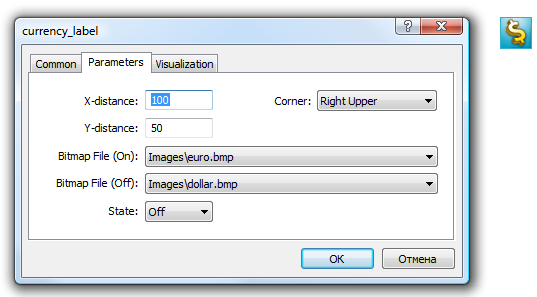
带有图形界面的按钮大小会自动调整至图片大小。通过左键点击 OBJ_BITMAPLABEL 对象可以更改图像(在属性中必须勾选“禁用选择”选项)。OBJ_BITMAP 对象也是以相同方式创建的——它用于创建带有所需图像的背景。
OBJPROP_BMPFILE 属性的值可以动态更改,该属性负责 OBJ_BITMAP 和 OBJ_BITMAPLABEL 对象的外观。这允许为 MQL4 程序创建各种交互式用户界面。
在编译 MQL4 程序时将资源包含到可执行文件
MQL4 程序可能需要许多不同形式的图像和声音文件作为下载资源。为了避免在移动可执行文件时传输所有这些文件,应使用编译器指令 #resource:
#resource path_to_resource_file#resource 命令告诉编译器应将指定路径 path_to_resource_file 中的资源包含到 EX5 可执行文件中。这样,所有必要的图像和声音可以直接位于 EX4 文件中,因此无需单独传输其中使用的文件,如果您想在不同的终端上运行程序。任何 EX4 文件都可以包含资源,任何 EX4 程序都可以使用其他 EX4 程序的资源。
BMP 和 WAV 格式的文件在包含到 EX4 文件之前会自动压缩。这意味着除了创建完整的 MQL4 程序外,使用资源还可以减少使用图形和声音时所需文件的总大小,与传统的 MQL4 程序编写方式相比。
资源文件的大小不得超过 16 Mb。
由编译器搜索指定资源
使用 #resource 命令插入资源:
#resource "<path_to_resource_file>"常量字符串 <path_to_resource_file> 的长度不得超过 63 个字符。
作为资源包含的文件和文件夹名称必须是英文。
编译器按以下顺序在指定路径中搜索资源:
- 如果路径开头有反斜杠“\”,则相对于 terminal_data_directory\MQL4 目录搜索资源;
- 如果没有反斜杠,则相对于包含资源的源文件的位置搜索资源。
资源路径不能包含子字符串“..\\”和“:\\”。
资源包含的示例:
//--- correct specification of resources
#resource "\\Images\\euro.bmp" // euro.bmp is located in terminal_data_directory\MQL4\Images\
#resource "picture.bmp"        // picture.bmp is located in the same directory as the source file
#resource "Resource\\map.bmp"  // the resource is located in source_file_directory\Resource\map.bmp

//--- incorrect specification of resources
#resource ":picture_2.bmp"     // must not contain ":"
#resource "..\\picture_3.bmp"  // must not contain ".."
#resource "\\Files\\Images\\Folder_First\\My_panel\\Labels\\too_long_path.bmp" //more than 63 symbols
使用资源
资源名称
使用 #resource 指令声明资源后,可以在程序的任何部分使用它。资源名称是其路径,开头没有反斜杠,这设置了资源的路径。要在代码中使用自己的资源,应在资源名称前添加特殊符号“::”。
示例:
//--- examples of resource specification and their names in comments
#resource "\\Images\\euro.bmp"          // resource name - Images\euro.bmp
#resource "picture.bmp"                 // resource name - picture.bmp
#resource "Resource\\map.bmp"           // resource name - Resource\map.bmp
#resource "\\Files\\Pictures\\good.bmp" // resource name - Files\Pictures\good.bmp
#resource "\\Files\\Demo.wav";          // resource name - Files\Demo.wav"
#resource "\\Sounds\\thrill.wav";       // resource name - Sounds\thrill.wav"
...

//--- utilization of resources
ObjectSetString(0,bitmap_name,OBJPROP_BMPFILE,0,"::Images\\euro.bmp");
...
ObjectSetString(0,my_bitmap,OBJPROP_BMPFILE,0,"::picture.bmp");
...
set=ObjectSetString(0,bitmap_label,OBJPROP_BMPFILE,1,"::Files\\Pictures\\good.bmp");
...
PlaySound("::Files\\Demo.wav");
...
PlaySound("::Sounds\\thrill.wav");
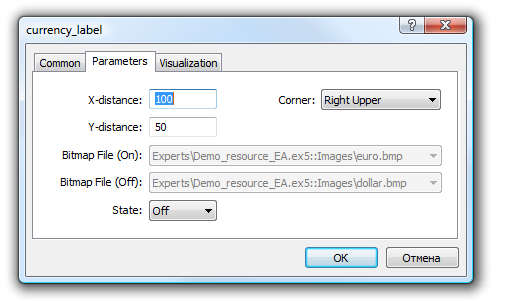
需要注意的是,当将资源中的图像设置为 OBJ_BITMAP 和 OBJ_BITMAPLABEL 对象时,无法手动修改 OBJPROP_BMPFILE 属性的值。例如,为了创建 OBJ_BITMAP_LABEL,我们使用 resources euro.bmp 和 dollar.bmp。
#resource "\\Images\\euro.bmp";    // euro.bmp is located in terminal_data_directory\MQL4\Images\
#resource "\\Images\\dollar.bmp";  // dollar.bmp is located in terminal_data_directory\MQL4\Images\
查看此对象的属性时,会发现 BitMap File (On) 和 BitMap File (Off) 属性是淡色的,无法手动更改:
使用其他 MQL4 程序的资源
使用资源的另一个优势是,可以在任何 MQL4 程序中使用其他 EX4 文件的资源。因此,一个 EX4 文件的资源可以在许多其他 mql4 程序中使用。
要使用来自其他文件的资源名称,应将其指定为 <path_EX4_file_name>::<resource_name>。例如,假设 Draw_Triangles_Script.mq5 脚本包含文件 triangle.bmp 中的图像资源:
#resource "\\Files\\triangle.bmp"那么其名称在脚本中使用时将是“Files\triangle.bmp”,要使用它,需要在资源名称前添加“::”。
//--- using the resource in the script
ObjectSetString(0,my_bitmap_name,OBJPROP_BMPFILE,0,"::Files\\triangle.bmp");
要从另一个程序使用相同的资源,例如从专家顾问中,需要向资源名称中添加相对于 terminal_data_directory\MQL4\ 的 EX4 文件路径和脚本的 EX4 文件名称 Draw_Triangles_Script.ex4。假设脚本位于标准文件夹 terminal_data_directory\MQL4\Scripts\ 中,那么调用应这样编写:
//--- using a resource from a script in an EA
ObjectSetString(0,my_bitmap_name,OBJPROP_BMPFILE,0,"\\Scripts\\Draw_Triangles_Script.ex4::Files\\triangle.bmp");
如果从另一个 EX4 调用资源时未指定可执行文件的路径,则会在包含调用资源的程序的同一文件夹中搜索可执行文件。这意味着如果专家顾问从 Draw_Triangles_Script.ex4 调用资源而不指定路径,如下所示:
//--- call script resource in an EA without specifying the path
ObjectSetString(0,my_bitmap_name,OBJPROP_BMPFILE,0,"Draw_Triangles_Script.ex4::Files\\triangle.bmp");
那么文件将在 terminal_data_directory\MQL4\Experts\ 文件夹中搜索,如果专家顾问位于 terminal_data_directory\MQL4\Experts\ 中。
使用作为资源的自定义指标
运行 MQL4 应用程序可能需要一个或多个自定义指标。它们都可以包含在可执行的 MQL5 程序的代码中。将指标作为资源包含可以简化应用程序的分发。
下面是包含和使用位于 terminal_data_folder\MQL4\Indicators\ 目录中的 SampleIndicator.ex4 自定义指标的示例:
//+------------------------------------------------------------------+
//|                                                     SampleEA.mq4 |
//|                        Copyright 2013, MetaQuotes Software Corp. |
//|                                              https://www.mql5.com |
//+------------------------------------------------------------------+
#resource "\\Indicators\\SampleIndicator.ex4"
#property strict
//+------------------------------------------------------------------+
//| Expert initialization function                                   |
//+------------------------------------------------------------------+
int OnInit()
  {
//--- get custom indicator value
   double value=iCustom(_Symbol,_Period,"::Indicators\\SampleIndicator.ex4",0,0);
   PrintFormat("Indicator: iCustom value=%f",value);
//--- ...
   return(INIT_SUCCEEDED);
  }
当自定义指标在 OnInit() 函数中创建一个或多个副本时,需要特别注意。请记住,资源应以以下方式指定:<path_EX4_file_name>::<resource_name>。
例如,如果 SampleIndicator.ex4 指标作为资源包含在 SampleEA.ex4 专家顾问中,那么在自定义指标初始化函数调用 iCustom() 时指定的路径如下:“\\Experts\\SampleEA.ex4::Indicators\\SampleIndicator.ex4”。当明确设置此路径时,SampleIndicator.ex4 自定义指标将严格连接到 SampleEA.ex4 专家顾问,失去独立工作的能力。
可以使用 GetRelativeProgramPath() 函数获取自身的路径。其使用示例如下:
//+------------------------------------------------------------------+
//|                                              SampleIndicator.mq4 |
//|                        Copyright 2013, MetaQuotes Software Corp. |
//|                                              https://www.mql5.com |
//+------------------------------------------------------------------+
#property indicator_separate_window
//+------------------------------------------------------------------+
//| Custom indicator initialization function                         |
//+------------------------------------------------------------------+
int OnInit()
  {
//--- the wrong way to provide a link to itself
//--- string path="\\Experts\\SampleEA.ex4::Indicators\\SampleIndicator.ex4";
//--- the right way to receive a link to itself
   string path=GetRelativeProgramPath();
//--- get indicator value
   double value=iCustom(_Symbol,_Period,path,0,0);
   PrintFormat("Path=%s, iCustom value=%f",path,value);
//---
   return(INIT_SUCCEEDED);
  }
///....
//+------------------------------------------------------------------+
//| GetRelativeProgramPath                                           |
//+------------------------------------------------------------------+
string GetRelativeProgramPath()
  {
   int pos2;
//--- get the absolute path to the application
   string path=MQLInfoString(MQL_PROGRAM_PATH);
//--- find the position of "\MQL4\" substring
   int    pos =StringFind(path,"\\MQL4\\");
//--- substring not found - error
   if(pos<0)
      return(NULL);
//--- skip "\MQL4" directory
   pos+=5;
//--- skip extra '\' symbols
   while(StringGetCharacter(path,pos+1)=='\\')
      pos++;
//--- if this is a resource, return the path relative to MQL5 directory
   if(StringFind(path,"::",pos)>=0)
      return(StringSubstr(path,pos));
//--- find a separator for the first MQL4 subdirectory (for example, MQL4\Indicators)
//--- if not found, return the path relative to MQL4 directory
   if((pos2=StringFind(path,"\\",pos+1))<0)
      return(StringSubstr(path,pos));
//--- return the path relative to the subdirectory (for example, MQL4\Indicators)
   return(StringSubstr(path,pos2+1));
  }
//+------------------------------------------------------------------+
//| Custom indicator iteration function                              |
//+------------------------------------------------------------------+
int OnCalculate(const int rates_total,
                const int prev_calculated,
                const int begin,
                const double& price[])
  {
//--- return value of prev_calculated for next call
   return(rates_total);
  }
另请参阅
ResourceCreate(), ResourceSave(), PlaySound(), ObjectSetInteger(), ChartApplyTemplate(), File Functions