User-defined Types
用户定义类型
C++中的typedef关键字允许创建用户定义的数据类型。要做到这一点,只需为已存在的数据类型指定一个新的数据类型名称。实际上并没有创建新的数据类型,而是为现有类型定义了一个新名称。用户定义的类型使应用程序更加灵活:有时,使用替换宏修改typedef指令就足够了(#define)。用户定义的类型还提高了代码的可读性,因为可以使用typedef为标准数据类型应用自定义名称。创建用户定义类型的条目的一般格式如下:
typedef type new_name;在这里,type表示任何可接受的数据类型,而new_name是该类型的新的名称。新名称仅作为现有类型名称的附加(而非替换)而设置。MQL5允许使用typedef创建指向函数的指针。
指向函数的指针
指向函数的指针通常按以下格式定义
typedef function_result_type (*Function_name_type)(list_of_input_parameters_types);在typedef之后,设置函数的签名(输入参数的数量和类型,以及函数返回的结果类型)。下面是一个创建和应用指向函数的指针的简单示例:
//--- declare a pointer to a function that accepts two int parameters
   typedef int (*TFunc)(int,int);
//--- TFunc is a type, and it is possible to declare the variable pointer to the function
   TFunc func_ptr; // pointer to the function
//--- declare the functions corresponding to the TFunc description
   int sub(int x,int y) { return(x-y); }  // subtract one number from another
   int add(int x,int y) { return(x+y); }  // addition of two numbers
   int neg(int x)       { return(~x);  }  // invert bits in the variable
//--- the func_ptr variable may store the function address to declare it later
   func_ptr=sub;
   Print(func_ptr(10,5));
   func_ptr=add;
   Print(func_ptr(10,5));
   func_ptr=neg;           // error: neg does not have int (int,int) type
   Print(func_ptr(10));    // error: two parameters needed
在这个示例中,func_ptr变量可以接收sub和add函数,因为这两个函数都有两个int类型的输入参数,如TFunc指向函数的定义中所规定的。相反,neg函数不能赋值给func_ptr指针,因为其签名不同。
在用户界面中安排事件模型
指向函数的指针允许在创建用户界面时轻松处理事件。首先,定义指向TAction函数的指针,该指针通过按下按钮调用,并根据TAction的描述创建三个函数。
//--- create a custom function type
typedef int(*TAction)(string,int);
//+------------------------------------------------------------------+
//|  Open the file                                                  |
//+------------------------------------------------------------------+
int Open(string name,int id)
  {
   PrintFormat("%s function called (name=%s id=%d)",__FUNCTION__,name,id);
   return(1);
  }
//+------------------------------------------------------------------+
//|  Save the file                                                  |
//+------------------------------------------------------------------+
int Save(string name,int id)
  {
   PrintFormat("%s function called (name=%s id=%d)",__FUNCTION__,name,id);
   return(2);
  }
//+------------------------------------------------------------------+
//|  Close the file                                                  |
//+------------------------------------------------------------------+
int Close(string name,int id)
  {
   PrintFormat("%s function called (name=%s id=%d)",__FUNCTION__,name,id);
   return(3);
  }
然后,从CButton创建MyButton类,在其中添加指向TAction函数的指针。
//+------------------------------------------------------------------+
//| Create the button class with the events processing function      |
//+------------------------------------------------------------------+
class MyButton: public CButton
  {
private:
   TAction           m_action;                    // chart events handler
public:
                     MyButton(void){}
                    ~MyButton(void){}
   //--- constructor specifying the button text and the pointer to the events handling function
                     MyButton(string text, TAction act)
     {
      Text(text);
      m_action=act;
     }
   //--- set the custom function called from the OnEvent() events handler
   void              SetAction(TAction act){m_action=act;}
   //--- standard chart events handler
   virtual bool      OnEvent(const int id,const long &lparam,const double &dparam,const string &sparam) override
     {
      if(m_action!=NULL && lparam==Id())
        {
         //--- call the custom m_action() handler
         m_action(sparam,(int)lparam);
         return(true);
        }
      else
      //--- return the result of calling the handler from the CButton parent class
         return(CButton::OnEvent(id,lparam,dparam,sparam));
     }
  };
从CAppDialog创建CControlsDialog派生类,向其添加m_buttons数组以存储MyButton类型的按钮,以及AddButton(MyButton &button)和CreateButtons()方法。
//+------------------------------------------------------------------+
//| CControlsDialog class                                            |
//| Objective: graphical panel for managing the application       |
//+------------------------------------------------------------------+
class CControlsDialog : public CAppDialog
  {
private:
   CArrayObj         m_buttons;                     // button array
public:
                     CControlsDialog(void){};
                    ~CControlsDialog(void){};
   //--- create
   virtual bool      Create(const long chart,const string name,const int subwin,const int x1,const int y1,const int x2,const int y2) override;
   //--- add the button
   bool              AddButton(MyButton &button){return(m_buttons.Add(GetPointer(button)));m_buttons.Sort();};
protected:
   //--- create the buttons
   bool              CreateButtons(void);
  };
//+------------------------------------------------------------------+
//| Create the CControlsDialog object on the chart                   |
//+------------------------------------------------------------------+
bool CControlsDialog::Create(const long chart,const string name,const int subwin,const int x1,const int y1,const int x2,const int y2)
  {
   if(!CAppDialog::Create(chart,name,subwin,x1,y1,x2,y2))
      return(false);
   return(CreateButtons());
//---
  }
//+------------------------------------------------------------------+
//| defines                                                          |
//+------------------------------------------------------------------+
//--- indents and gaps
#define INDENT_LEFT                         (11)      // indent from left (with allowance for border width)
#define INDENT_TOP                          (11)      // indent from top (with allowance for border width)
#define CONTROLS_GAP_X                      (5)       // gap by X coordinate
#define CONTROLS_GAP_Y                      (5)       // gap by Y coordinate
//--- for buttons
#define BUTTON_WIDTH                        (100)     // size by X coordinate
#define BUTTON_HEIGHT                       (20)      // size by Y coordinate
//--- for the indication area
#define EDIT_HEIGHT                         (20)      // size by Y coordinate
//+------------------------------------------------------------------+
//| Create and add buttons to the CControlsDialog panel           |
//+------------------------------------------------------------------+
bool CControlsDialog::CreateButtons(void)
  {
//--- calculate buttons coordinates
   int x1=INDENT_LEFT;
   int y1=INDENT_TOP+(EDIT_HEIGHT+CONTROLS_GAP_Y);
   int x2;
   int y2=y1+BUTTON_HEIGHT;
//--- add buttons objects together with pointers to functions
   AddButton(new MyButton("Open",Open));
   AddButton(new MyButton("Save",Save));
   AddButton(new MyButton("Close",Close));
//--- create the buttons graphically
   for(int i=0;i<m_buttons.Total();i++)
     {
      MyButton *b=(MyButton*)m_buttons.At(i);
      x1=INDENT_LEFT+i*(BUTTON_WIDTH+CONTROLS_GAP_X);
      x2=x1+BUTTON_WIDTH;
      if(!b.Create(m_chart_id,m_name+"bt"+b.Text(),m_subwin,x1,y1,x2,y2))
        {
         PrintFormat("Failed to create button %s %d",b.Text(),i);
         return(false);
        }
      //--- add each button to the CControlsDialog container
      if(!Add(b))
         return(false);
     }
//--- succeed
   return(true);
  }
现在,我们可以使用具有3个按钮的CControlsDialog控件面板来开发程序:打开、保存和关闭。当点击按钮时,会调用相应的函数,该函数以TFunc指向函数的形式出现。
//--- declare the object on the global level to automatically create it when launching the program
CControlsDialog MyDialog;
//+------------------------------------------------------------------+
//| Expert initialization function                                   |
//+------------------------------------------------------------------+
int OnInit()
  {
//--- now, create the object on the chart
   if(!MyDialog.Create(0,"Controls",0,40,40,380,344))
      return(INIT_FAILED);
//--- launch the application
   MyDialog.Run();
//--- application successfully initialized
   return(INIT_SUCCEEDED);
  }
//+------------------------------------------------------------------+
//| Expert deinitialization function                                 |
//+------------------------------------------------------------------+
void OnDeinit(const int reason)
  {
//--- clear comments when the application shuts down
   Comment("");
//--- destroy dialog
   MyDialog.Destroy(reason);
  }
//+------------------------------------------------------------------+
//| Expert chart event function                                      |
//+------------------------------------------------------------------+
void OnChartEvent(const int id,         // event ID
                  const long& lparam,   // event parameter of the long type
                  const double& dparam, // event parameter of the double type
                  const string& sparam) // event parameter of the string type
  {
//--- call the handler from the parent class (here it is CAppDialog) for the chart events
   MyDialog.ChartEvent(id,lparam,dparam,sparam);
  }
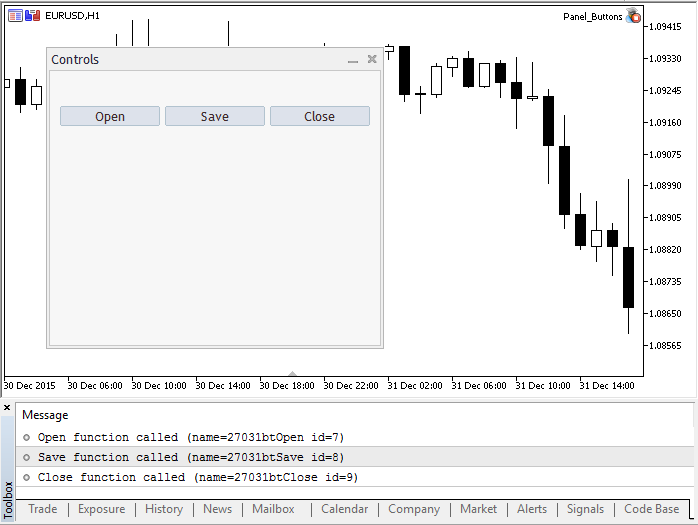
启动的应用程序的外观和按钮点击结果在截图中展示。
程序的完整源代码
//+------------------------------------------------------------------+
//|                                                Panel_Buttons.mq5 |
//|                        Copyright 2017, MetaQuotes Software Corp. |
//|                                             https://www.mql5.com |
//+------------------------------------------------------------------+

#property copyright "Copyright 2017, MetaQuotes Software Corp."
#property link      "https://www.mql5.com"
#property version   "1.00"
#property description "The panel with several CButton buttons"
#include <Controls\Dialog.mqh>
#include <Controls\Button.mqh>
//+------------------------------------------------------------------+
//| defines                                                          |
//+------------------------------------------------------------------+
//--- indents and gaps
#define INDENT_LEFT                         (11)      // indent from left (with allowance for border width)
#define INDENT_TOP                          (11)      // indent from top (with allowance for border width)
#define CONTROLS_GAP_X                      (5)       // gap by X coordinate
#define CONTROLS_GAP_Y                      (5)       // gap by Y coordinate
//--- for buttons
#define BUTTON_WIDTH                        (100)     // size by X coordinate
#define BUTTON_HEIGHT                       (20)      // size by Y coordinate
//--- for the indication area
#define EDIT_HEIGHT                         (20)      // size by Y coordinate

//--- create the custom function type
typedef int(*TAction)(string,int);
//+------------------------------------------------------------------+
//|  Open the file                                                  |
//+------------------------------------------------------------------+
int Open(string name,int id)
  {
   PrintFormat("%s function called (name=%s id=%d)",__FUNCTION__,name,id);
   return(1);
  }
//+------------------------------------------------------------------+
//|  Save the file                                                  |
//+------------------------------------------------------------------+
int Save(string name,int id)
  {
   PrintFormat("%s function called (name=%s id=%d)",__FUNCTION__,name,id);
   return(2);
  }
//+------------------------------------------------------------------+
//|  Close the file                                                  |
//+------------------------------------------------------------------+
int Close(string name,int id)
  {
   PrintFormat("%s function called (name=%s id=%d)",__FUNCTION__,name,id);
   return(3);
  }
//+------------------------------------------------------------------+
//| Create the button class with the events processing function      |
//+------------------------------------------------------------------+
class MyButton: public CButton
  {
private:
   TAction           m_action;                    // chart events handler
public:
                     MyButton(void){}
                    ~MyButton(void){}
   //--- constructor specifying the button text and the pointer to the events handling function
                     MyButton(string text,TAction act)
     {
      Text(text);
      m_action=act;
     }
   //--- set the custom function called from the OnEvent() events handler
   void              SetAction(TAction act){m_action=act;}
   //--- standard chart events handler
   virtual bool      OnEvent(const int id,const long &lparam,const double &dparam,const string &sparam) override
     {
      if(m_action!=NULL && lparam==Id())
        {
         //--- call the custom handler
         m_action(sparam,(int)lparam);
         return(true);
        }
      else
      //--- return the result of calling the handler from the CButton parent class
         return(CButton::OnEvent(id,lparam,dparam,sparam));
     }
  };
//+------------------------------------------------------------------+
//| CControlsDialog class                                            |
//| Objective: graphical panel for managing the application       |
//+------------------------------------------------------------------+
class CControlsDialog : public CAppDialog
  {
private:
   CArrayObj         m_buttons;                     // button array
public:
                     CControlsDialog(void){};
                    ~CControlsDialog(void){};
   //--- create
   virtual bool      Create(const long chart,const string name,const int subwin,const int x1,const int y1,const int x2,const int y2) override;
   //--- add the button
   bool              AddButton(MyButton &button){return(m_buttons.Add(GetPointer(button)));m_buttons.Sort();};
protected:
   //--- create the buttons
   bool              CreateButtons(void);
  };
//+------------------------------------------------------------------+
//| Create the CControlsDialog object on the chart                   |
//+------------------------------------------------------------------+
bool CControlsDialog::Create(const long chart,const string name,const int subwin,const int x1,const int y1,const int x2,const int y2)
  {
   if(!CAppDialog::Create(chart,name,subwin,x1,y1,x2,y2))
      return(false);
   return(CreateButtons());
//---
  }
//+------------------------------------------------------------------+
//| Create and add buttons to the CControlsDialog panel           |
//+------------------------------------------------------------------+
bool CControlsDialog::CreateButtons(void)
  {
//--- calculate buttons coordinates
   int x1=INDENT_LEFT;
   int y1=INDENT_TOP+(EDIT_HEIGHT+CONTROLS_GAP_Y);
   int x2;
   int y2=y1+BUTTON_HEIGHT;
//--- add buttons objects together with pointers to functions
   AddButton(new MyButton("Open",Open));
   AddButton(new MyButton("Save",Save));
   AddButton(new MyButton("Close",Close));
//--- create the buttons graphically
   for(int i=0;i<m_buttons.Total();i++)
     {
      MyButton *b=(MyButton*)m_buttons.At(i);
      x1=INDENT_LEFT+i*(BUTTON_WIDTH+CONTROLS_GAP_X);
      x2=x1+BUTTON_WIDTH;
      if(!b.Create(m_chart_id,m_name+"bt"+b.Text(),m_subwin,x1,y1,x2,y2))
        {
         PrintFormat("Failed to create button %s %d",b.Text(),i);
         return(false);
        }
      //--- add each button to the CControlsDialog container
      if(!Add(b))
         return(false);
     }
//--- succeed
   return(true);
  }
//--- declare the object on the global level to automatically create it when launching the program
CControlsDialog MyDialog;
//+------------------------------------------------------------------+
//| Expert initialization function                                   |
//+------------------------------------------------------------------+
int OnInit()
  {
//--- now, create the object on the chart
   if(!MyDialog.Create(0,"Controls",0,40,40,380,344))
      return(INIT_FAILED);
//--- launch the application
   MyDialog.Run();
//--- application successfully initialized
   return(INIT_SUCCEEDED);
  }
//+------------------------------------------------------------------+
//| Expert deinitialization function                                 |
//+------------------------------------------------------------------+
void OnDeinit(const int reason)
  {
//--- clear comments when the application shuts down
   Comment("");
//--- destroy dialog
   MyDialog.Destroy(reason);
  }
//+------------------------------------------------------------------+
//| Expert chart event function                                      |
//+------------------------------------------------------------------+
void OnChartEvent(const int id,         // event ID
                  const long& lparam,   // event parameter of the long type
                  const double& dparam, // event parameter of the double type
                  const string& sparam) // event parameter of the string type
  {
//--- call the handler from the parent class (here it is CAppDialog) for the chart events
   MyDialog.ChartEvent(id,lparam,dparam,sparam);
  }