IndicatorSetInteger
IndicatorSetInteger
此函数设置相应指示符属性的值。指示符属性必须是 int 或 color 类型。该函数有两种变体。
通过指定属性标识符调用。
bool  IndicatorSetInteger(
   int  prop_id,           // identifier
   int  prop_value         // value to be set
   );
通过指定属性标识符和修饰符调用。
bool  IndicatorSetInteger(
   int  prop_id,           // identifier
   int  prop_modifier,     // modifier
   int  prop_value         // value to be set
   )
参数
- prop_id
[in] 指示符属性的标识符。值可以是 ENUM_CUSTOMIND_PROPERTY_INTEGER枚举中的值之一。
- prop_modifier
[in] 指定属性的修饰符。只有级别属性需要修饰符。
- prop_value
[in] 属性的值。
返回值
如果执行成功,则返回 true;否则返回 false。
注意
使用 #property 指令时,属性(修饰符)的编号从 1 开始,而该函数使用从 0 开始的编号。如果级别编号设置错误,指示符显示可能会与预期的不同。
例如,要设置第一条水平线的厚度,请使用第 0 个索引:
- IndicatorSetInteger(INDICATOR_LEVELWIDTH, 0, 5) - 使用索引 0 设置第一级的厚度。
示例:将放置水平线的级别的数值颠倒的指示符。
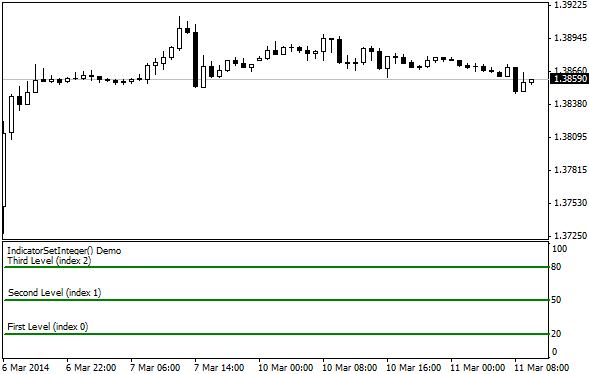
#property indicator_separate_window
//--- set the maximum and minimum values for the indicator window
#property indicator_minimum 0
#property indicator_maximum 100
//--- display three horizontal levels in a separate indicator window
#property indicator_level1 20
#property indicator_level2 50
#property indicator_level3 80
//--- set thickness of horizontal levels
#property indicator_levelwidth 5
//--- set color of horizontal levels
#property indicator_levelcolor clrAliceBlue
//--- set style of horizontal levels
#property indicator_levelstyle STYLE_DOT
//+------------------------------------------------------------------+
//| Custom indicator initialization function                         |
//+------------------------------------------------------------------+
int OnInit()
  {
//--- set descriptions of horizontal levels
   IndicatorSetString(INDICATOR_LEVELTEXT,0,"First Level (index 0)");
   IndicatorSetString(INDICATOR_LEVELTEXT,1,"Second Level (index 1)");
   IndicatorSetString(INDICATOR_LEVELTEXT,2,"Third Level (index 2)");
//--- set the short name for indicator
   IndicatorSetString(INDICATOR_SHORTNAME,"IndicatorSetInteger() Demo");
   return(INIT_SUCCEEDED);
  }
//+------------------------------------------------------------------+
//| Custom indicator iteration function                              |
//+------------------------------------------------------------------+
int OnCalculate(const int rates_total,
                const int prev_calculated,
                const datetime &time[],
                const double &open[],
                const double &high[],
                const double &low[],
                const double &close[],
                const long &tick_volume[],
                const long &volume[],
                const int &spread[])
  {
   static int tick_counter=0;
//--- calculate ticks
   tick_counter++;
//--- and calculate colors of horizontal levels depending on the tick counter
   ChangeLevelsColor(tick_counter,3,6,10); // three last parameters are switching the color
//--- modify style of horizontal levels
   ChangeLevelStyle(tick_counter);
//--- get width as the remainder of integer division of the ticks number by 5
   int width=tick_counter%5;
//--- iterate over all horizontal levels and set thickness
   IndicatorSetInteger(INDICATOR_LEVELWIDTH,0,width+1);
//--- return value of prev_calculated for next call
   return(rates_total);
  }
//+------------------------------------------------------------------+
//| Set color of horizontal line in the separate indicator window    |
//+------------------------------------------------------------------+
void ChangeLevelsColor(int tick_number,// dividend, number to get the remainder of division
                       int f_trigger,  // first divisor of color switching
                       int s_trigger,  // second divisor of color switching
                       int t_trigger)  // third divisor of color switching
  {
   static color colors[3]={clrRed,clrBlue,clrGreen};
//--- index of color from the colors[] array
   int index=-1;
//--- calculate the number of color from the colors[] array to paint horizontal line
   if(tick_number%f_trigger==0)
      index=0;   // if tick_number divides by f_trigger without the remainder
   if(tick_number%s_trigger==0)
      index=1;   // if tick_number divides by s_trigger without the remainder
   if(tick_number%t_trigger==0)
      index=2;   // if tick_number divides by t_trigger without the remainder
//--- if color is defined, set it
   if(index!=-1)
      IndicatorSetInteger(INDICATOR_LEVELCOLOR,0,colors[index]);
//---
  }
//+------------------------------------------------------------------+
//| Set style of horizontal line in the separate indicator window    |
//+------------------------------------------------------------------+
void ChangeLevelStyle(int tick_number) // number to get the remainder of division
  {
//--- array to store styles
   static ENUM_LINE_STYLE styles[5]=
     {STYLE_SOLID,STYLE_DASH,STYLE_DOT,STYLE_DASHDOT,STYLE_DASHDOTDOT};
//--- index of style from the styles[] array
   int index=-1;
//--- calculate the number from the styles[] array to set style of horizontal line
   if(tick_number%50==0)
      index=5;   // if tick_number divides by 50 without the remainder, then style is STYLE_DASHDOTDOT
   if(tick_number%40==0)
      index=4;   // ... STYLE_DASHDOT
   if(tick_number%30==0)
      index=3;   // ... STYLE_DOT
   if(tick_number%20==0)
      index=2;   // ... STYLE_DASH
   if(tick_number%10==0)
      index=1;   // ... STYLE_SOLID
//--- if style is defined, set it
   if(index!=-1)
      IndicatorSetInteger(INDICATOR_LEVELSTYLE,0,styles[index]);
  }
另请参阅
最后更新于