ChartApplyTemplate
ChartApplyTemplate
将指定文件中的特定模板应用于图表。该命令被添加到图表消息队列中,并且只有在所有先前的命令处理完成后才会执行。
bool  ChartApplyTemplate(
   long          chart_id,     // Chart ID
   const string  filename      // Template file name
   );
参数
- chart_id
[in] 图表ID。0表示当前图表。
- filename
[in] 包含模板的文件名称。
返回值
如果命令已添加到图表队列,则返回true;否则返回false。要获取错误详情,请使用GetLastError()函数。
注意
如果成功将新模板加载到所附加的图表中,专家顾问将被卸载,无法继续运行。
实时交易和DLL导入
用户可以允许或禁止在图表上启动的mql4程序执行以下操作:
- 进行交易操作(实时交易),
- DLL导入。
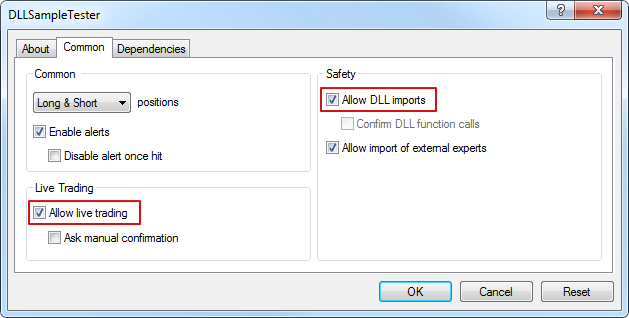
终端允许将配置的图表保存为模板,包括在其上启动的所有指标和专家顾问。因此,可以快速将模板设置应用于所有其他图表。保存模板时,也会保存已启动程序的权限(实时交易和DLL导入)。在将模板应用于图表时,出于安全原因,这些权限可能会被限制:
| 使用ChartApplyTemplate()函数应用模板时,无法扩展专家顾问的实时交易和DLL导入权限。 |
如果调用ChartApplyTemplate()函数的mql4程序没有交易权限,通过模板启动的专家顾问也无法进行交易,无论模板设置如何。
如果调用ChartApplyTemplate()函数的mql4程序有交易权限,但模板设置中没有这种权限,通过模板启动的专家顾问也无法进行交易。
使用模板
MQL4语言资源允许使用ChartSetInteger()函数设置多个图表属性,包括颜色:
- 图表背景颜色;
- 轴、比例尺和OHLC线的颜色;
- 网格颜色;
- 成交量和位置开单水平的颜色;
- 看涨蜡烛图的上升条形图、阴影和边缘的颜色;
- 看跌蜡烛图的下降条形图、阴影和边缘的颜色;
- 图表线和Doji蜡烛图的颜色;
- 看涨蜡烛图实体的颜色;
- 看跌蜡烛图实体的颜色;
- 买入价线的颜色;
- 卖出价线的颜色;
- 最后交易价格线(Last)的颜色;
- 止损和止盈订单水平线的颜色。
此外,图表上可以有多个图形对象和指标。您可以一次性设置包含所有必要指标的图表,然后将其保存为模板。这样的模板可以应用于任何图表。
ChartApplyTemplate()函数用于使用之前保存的模板,可以在任何mql4程序中使用。存储模板的文件路径作为ChartApplyTemplate()的第二个参数传递。模板文件按照以下规则搜索:
- 如果路径开头有反斜杠“\”分隔符(写作“\”),则模板相对于_path _terminal_data_directory\MQL4进行搜索;
- 如果没有反斜杠,则模板相对于调用ChartApplyTemplate()的可执行EX4文件进行搜索;
- 如果在前两种情况下找不到模板,则在中搜索terminal_directory\Profiles\Templates\文件夹。
- 这里的terminal_directory是运行MetaTrader 4客户端终端的文件夹,而terminal_data_directory是存储可编辑文件的文件夹,其位置取决于操作系统、用户名和计算机的安全设置。通常它们是不同的文件夹,但在某些情况下它们可能相同。
- 可以使用TerminalInfoString()函数获取terminal_data_directory和terminal_directory文件夹的位置。
//--- directory from which the terminal is started
   string terminal_path=TerminalInfoString(TERMINAL_PATH);
   Print("Terminal directory:",terminal_path);
//--- terminal data directory, in which the MQL4 folder with EAs and indicators is located
   string terminal_data_path=TerminalInfoString(TERMINAL_DATA_PATH);
   Print("Terminal data directory:",terminal_data_path);
例如:
//--- search for a template in terminal_data_directory\MQL4\
ChartApplyTemplate(0,"\\first_template.tpl"))

//--- search for a template in directory_of_EX4_file\, then in folder terminal_data_directory\Profiles\Templates\
ChartApplyTemplate(0,"second_template.tpl"))

//--- search for a template in directory_of_EX4_file\My_templates\, then in folder terminal_directory\Profiles\Templates\My_templates\
ChartApplyTemplate(0,"My_templates\\third_template.tpl"))
- 模板不是资源,不能包含到可执行的EX4文件中。 示例:
//+------------------------------------------------------------------+
//| Script program start function                                    |
//+------------------------------------------------------------------+
void OnStart()
  {
//--- example of applying template, located in \MQL4\Files
   if(FileIsExist("my_template.tpl"))
     {
      Print("The file my_template.tpl found in \Files'");
      //--- apply template
      if(ChartApplyTemplate(0,"\\Files\\my_template.tpl"))
        {
         Print("The template 'my_template.tpl' applied successfully");
        }
      else
         Print("Failed to apply 'my_template.tpl', error code ",GetLastError());
     }
   else
     {
      Print("File 'my_template.tpl' not found in "
            +TerminalInfoString(TERMINAL_PATH)+"\\MQL4\\Files");
     }
  }
另请参阅
最后更新于