Market Info
Getting Market Information
These are functions intended for receiving information about the market state.
| Function | Action |
|---|---|
| MarketInfo | Returns various data about securities listed in the “Market Watch” window |
| SymbolsTotal | Returns the number of available (selected in Market Watch or all) symbols |
| SymbolName | Returns the name of a specified symbol |
| SymbolSelect | Selects a symbol in the Market Watch window or removes a symbol from the window |
| SymbolInfoDouble | Returns the double value of the symbol for the corresponding property |
| SymbolInfoInteger | Returns a value of an integer type (long, datetime, int or bool) of a specified symbol for the corresponding property |
| SymbolInfoString | Returns a value of the string type of a specified symbol for the corresponding property |
| SymbolInfoTick | Returns the current prices for the specified symbol in a variable of the MqlTick type |
| SymbolInfoSessionQuote | Allows receiving time of beginning and end of the specified quoting sessions for a specified symbol and day of week. |
| SymbolInfoSessionTrade | Allows receiving time of beginning and end of the specified trading sessions for a specified symbol and day of week. |
What’s new in MQL5
Added the functions for working with the Depth of Market to obtain exchange data. Visually, it is presented as a table of Sell and Buy limit orders for traded assets. The format is the same for currency pairs, stocks, metals and futures.
The Depth of Market featuring orders of market participants is available in the trading platform. The Bid and Ask prices are formed in the Market Depth based on the best orders. These prices are shown in the Market Watch window. Besides, the exchange provides prices and volumes of the last executed deals (Last and Volume). The Last prices are used for creating price charts and for displaying the Time & Sales:
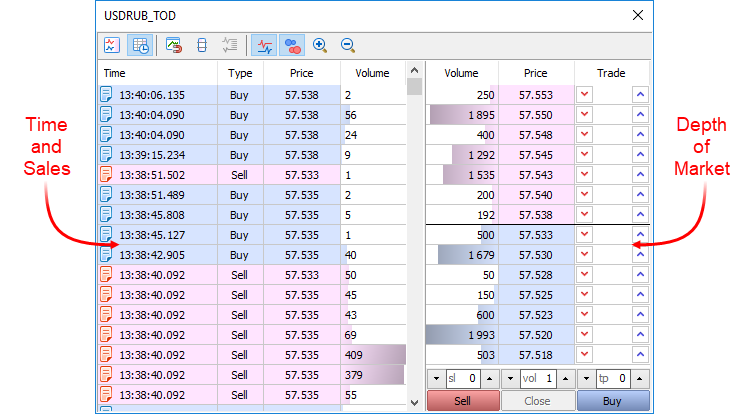
The new functions allow you to develop strategies based on deals volume and order flow, create a custom Depth of Market for manual trading and carry out automatic analysis in real time.
| Function | Action |
|---|---|
| MarketBookAdd | Open the Depth of Market for a specified symbol and subscribe to receiving the Depth of Market changes |
| MarketBookRelease | Close the Depth of Market for a specified symbol and unsubscribe from receiving the Depth of Market changes |
| MarketBookGet | Return the MqlBookInfo array of structures containing data from the specified symbol’s Depth of Market |